Documentation for Slink
Introduction
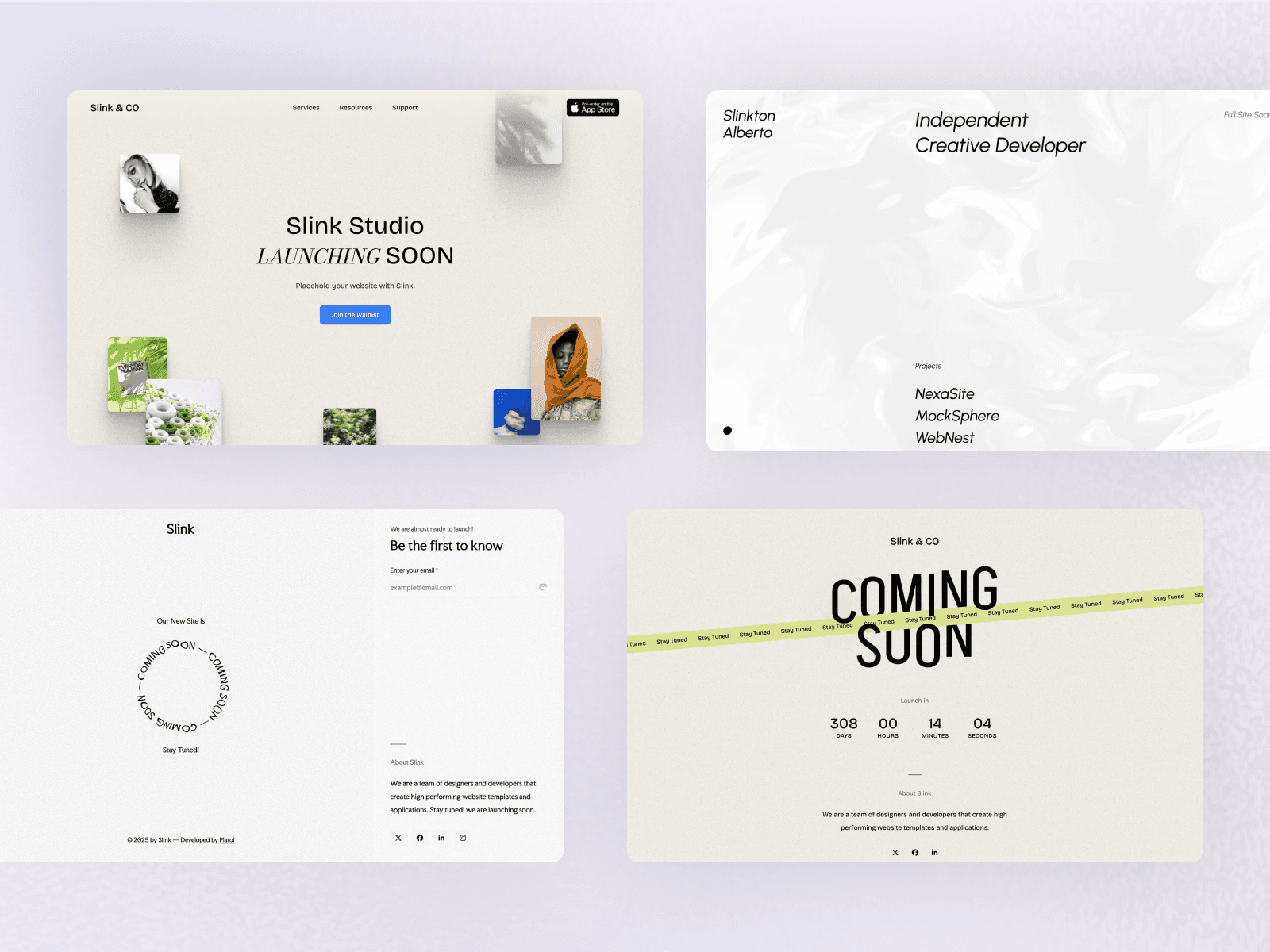
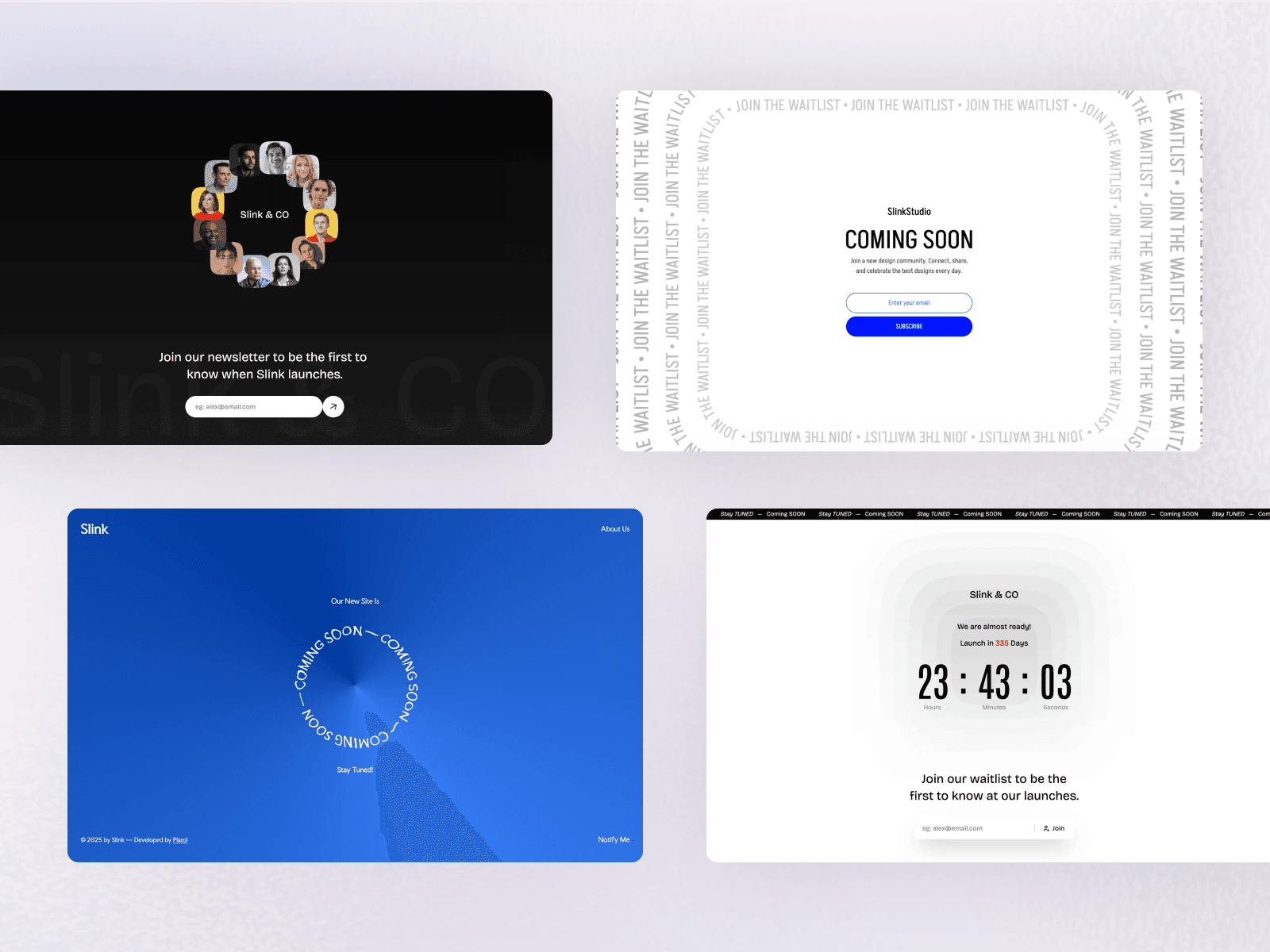
Slink is a modern Coming Soon Astro template designed for startups, creatives, and developers. Built with Astro v7 and TailwindCSS v4, it comes packed with 10 unique demo layouts, countdown timers, and smooth interactive animations.
File Structure
The theme files are structured as follows:
 ./theme-files
│
├── public
│  │
│  ├── favicon.png
│  │
│  └── ogimage.png
│
├── src
│  │
│  ├── assets
│  │
│  ├── components
│  │
│  ├── data
│  │
│  ├── layouts
│  │
│  ├── pages
│  │
│  ├── styles
│  │
│  └── utils
│
├── .gitignore
│
├── astro.config.mjs
│
├── package.json
│
└── tsconfig.json
Quick Start & Installation
Getting your project up and running locally takes less than two minutes.
System Requirements
- Node.js -
v22.12.0or higher installed on your computer (Download Node.js). - Code Editor - We recommend VS Code with the Official Astro Extension.
- Terminal - Mac Terminal, Command Prompt, or VS Code integrated terminal.
Step 1: Install Dependencies
Unzip your downloaded template, open your terminal, navigate into the project folder, and run:
npm install

# or if you use yarn:

yarn install
Step 2: Start Local Preview
Start the local development server:
npm run dev

# or with yarn:

yarn dev
Open http://localhost:4321 in your web browser. You will see the local preview running live with instant updates as you edit files!
Choosing Your Homepage Demo
Out of the box, Slink includes a Showcase Directory on the homepage (src/pages/index.astro) that links to all 10 individual demo pages (/demo-1 through /demo-10).
When you are ready to publish your own site, you will want your favorite demo design to appear directly as your main homepage (/).
How to Set Any Demo as Your Homepage
Setting your favorite demo as the homepage is very straightforward:
Option A: Replace the Homepage Content (Recommended)
- Pick your preferred demo from the 10 included layouts (for example, Demo 3).
- Open
src/pages/demo-3.astroin your editor and copy all of its code. - Open
src/pages/index.astro, delete everything currently inside it, and paste the copied code. - Save the file.
Your main homepage (http://localhost:4321/) will now instantly display your chosen demo!
Here is what the code inside src/pages/index.astro looks like once you set Demo 3:
---
import BaseLayout from '@/layouts/BaseLayout.astro';
import { Demo3 } from '@/components/demo3/Demo3';
import { demo3Config } from '@/data/demo3';
import { siteConfig } from '@/data/site';
---

<BaseLayout
  title={siteConfig.title}
  description={demo3Config.hero.line2}
  fonts={['bodoni', 'inter']}
>
  <Demo3 client:load config={demo3Config} />
</BaseLayout>
Option B: Rename the Files
- Rename
src/pages/index.astrotosrc/pages/showcase.astro(or delete it if you don't need the showcase page anymore). - Rename your chosen demo file (e.g.
src/pages/demo-3.astro) tosrc/pages/index.astro. - Save the file. That demo is now your homepage!
[!TIP] You can keep or delete the unused
demo-*.astrofiles insrc/pages/. Deleting unused demo pages keeps your final production build lean and clean.
Updating Website Content & Text
Slink is designed so that you never have to touch complex layout or component code to update your content. All text, titles, countdown dates, and social links are kept in simple data files inside src/data/.
Global Site Settings
Open src/data/site.ts to update your brand identity, SEO metadata, and social media links.
export const siteConfig: SiteConfig = {
  name: 'Your Brand Name',
  title: 'Your Brand - Coming Soon',
  description: 'A short sentence about your upcoming product or website.',
  url: 'https://yourwebsite.com',
  author: {
    name: 'Your Brand or Name',
    url: 'https://yourwebsite.com/',
  },
  socials: [
    {
      name: 'X (Twitter)',
      url: 'https://twitter.com/yourhandle',
      icon: 'x',
    },
    {
      name: 'Facebook',
      url: 'https://facebook.com/yourpage',
      icon: 'facebook',
    },
    {
      name: 'LinkedIn',
      url: 'https://linkedin.com/company/yourcompany',
      icon: 'linkedin',
    },
    {
      name: 'Instagram',
      url: 'https://instagram.com/yourhandle',
      icon: 'instagram',
    },
    {
      name: 'GitHub',
      url: 'https://github.com/yourhandle',
      icon: 'github',
    },
  ],
};
name: Your business or project name.title: The title displayed in the browser tab and search engine results.description: The summary shown on search engines and when sharing your link on social media.url: Your website's live web address.socials: Add, remove, or update your social media links.
Customizing Your Chosen Demo
Each of the 10 included demos is powered by unique interactive components and has its own dedicated configuration file in src/data/:
| Demo | Signature Interactive Feature | Configuration File |
|---|---|---|
| Demo 1 | Minimalist countdown with interactive slide-out notification drawer (NotifyDrawer) | src/data/demo1.ts |
| Demo 2 | Creative typography with interactive WebGL/Canvas Aurora gradient background (Aurora.jsx) | src/data/demo2.ts |
| Demo 3 | Dynamic cursor proximity physics (TextCursorProximity — letters tilt dynamically on mouse proximity) + countdown | src/data/demo3.ts |
| Demo 4 | Split-screen dual-column layout with countdown timer and notify form | src/data/demo4.ts |
| Demo 5 | Interactive floating photo card deck drifting smoothly with mouse parallax (Floating.tsx) | src/data/demo5.ts |
| Demo 6 | Circular rotating elements (CirclingElements) with kinetic vertical cut text reveal (VerticalCutReveal) | src/data/demo6.ts |
| Demo 7 | Ambient background audio player with sound waveform toggle (AudioPlayer.tsx) | src/data/demo7.ts |
| Demo 8 | Retro mechanical 3D flip clock countdown timer (FlipClock.tsx) | src/data/demo8.ts |
| Demo 9 | Vibrant mesh gradient with centered notify subscription card | src/data/demo9.ts |
| Demo 10 | Curved animated SVG typography path animation (AnimatedPathText.tsx) | src/data/demo10.ts |
You only need to edit the single file corresponding to the demo you have selected as your homepage.
Customizing Demo 3
Open src/data/demo3.ts to customize headlines, countdown date, about story, and newsletter texts:
export const demo3Config: Demo3Config = {
  logo: {
    text: 'Slink & CO',        // Your logo text
    href: '/',                 // Link target (usually '/')
  },
  countdownDate: '2026-12-31T23:59:59', // Your target launch date
  hero: {
    line1: 'Hey, Welcome!',
    line2: 'Our Brand New Website Is',
    line3: 'Coming Soon',
  },
  card: {
    backgroundImage: bgImg.src,
    newsletterHeading: 'Join our newsletter to be the first to know when we launch.',
    emailPlaceholder: 'Enter your email address...',
    submitButtonText: 'Subscribe',
    successButtonText: 'Thank You!',
  },
  about: {
    subtitle: 'Who are we?',
    title: 'Shaping the future of our industry.',
    content: [
      'Write your first paragraph introducing your brand or story here...',
      'Write your second paragraph here...',
    ],
    author: 'Your Team',
    authorSubtitle: 'Founders & Creators',
  },
  socials: [
    { name: 'X/Twitter', url: 'https://twitter.com/yourbrand', icon: 'x' },
    { name: 'Instagram', url: 'https://instagram.com/yourbrand', icon: 'instagram' },
    { name: 'LinkedIn', url: 'https://linkedin.com/company/yourbrand', icon: 'linkedin' },
  ],
  footer: {
    copyrightText: 'All rights reserved — Created by',
    authorName: 'Your Brand',
    authorUrl: 'https://yourwebsite.com/',
  },
};
How to Set the Countdown Launch Date
For demos with a live countdown timer (like Demo 3, Demo 4, Demo 7, etc.), find the countdownDate line in your demo's data file:
countdownDate: '2026-12-31T23:59:59',
Format: YYYY-MM-DDTHH:mm:ss
YYYY: Year (e.g.2026)MM: Month (01to12)DD: Day (01to31)T: Separator between date and time (keep the capitalT)HH: Hour in 24-hour format (00to23)mm: Minutes (00to59)ss: Seconds (00to59)
Example: To set the countdown to launch on November 15, 2026 at 9:00 AM, set:
countdownDate: '2026-11-15T09:00:00',
Changing Logos, Favicon & Images
Favicon & Social Share Image
- Browser tab icon (Favicon): Replace
public/favicon.pngwith your own square icon file (PNG format, 32x32 or 64x64 pixels). - Social Media Preview Image (Open Graph): Replace
public/ogimage.pngwith your custom banner (recommended size:1200 x 630pixels). This image will automatically be shown whenever someone shares your website link on social media.
Demo Background & Gallery Images
- Demo background images and preview graphics are stored in
src/assets/(e.g.src/assets/demo-3/,src/assets/demo-5/,src/assets/demo-6/). - To replace an image, you can drop your own image with the same name into the respective folder, or import your new image file in the corresponding component/data file.
Changing Fonts
Slink comes with 8 pre-configured Google Fonts using Astro's built-in Font API:
AksharAntonioBodoni Moda(bodoni)Bricolage Grotesque(bricolage)Faculty Glyphic(faculty)GabaritoInterUrbanist
All fonts are defined in astro.config.mjs.
How to Switch Fonts on Your Page
To change the font on your page, open your src/pages/index.astro (or demo-*.astro) file and change the font names inside the fonts prop of <BaseLayout>:
<BaseLayout
  title={siteConfig.title}
  description={demo1Config.drawer.subtitle}
  fonts={['inter', 'bricolage']}
>
  <Demo1 client:load config={demo1Config} />
</BaseLayout>
Astro automatically downloads and optimizes the selected fonts on-demand. There is no layout shift and no need to manually download or link font files!
Connecting Email Subscriptions
Slink includes pre-built newsletter forms and slide-out notify drawers.
To connect your subscription form to an email marketing service (such as Formspree, ConvertKit, Mailchimp, or a custom API endpoint):
- Open the component file for your chosen demo in
src/components/(e.g.src/components/demo1/NotifyDrawer.tsxorsrc/components/demo3/Demo3.tsx). - Update the form submission handler or replace the form action URL with your form endpoint.
Building for Production & Deployment
Once your content is ready and you want to launch your coming soon page:
1. Build the Site
Run the build command in your terminal:
npm run build

# or with yarn:

yarn build
Astro will generate an ultra-fast, fully optimized static website in the dist/ directory.
2. Deploy
You can deploy the output to any static hosting service in minutes:
- Vercel (Recommended): Push your project to GitHub, connect your repository on Vercel, and click Deploy. Astro is auto-detected.
- Netlify: Connect your GitHub repository to Netlify and select the Astro build preset.
- Cloudflare Pages / GitHub Pages: Deploy the
dist/folder directly.