Introduction
A portfolio is the single most important page a developer, designer, or creative can own. It needs to load instantly, look sharp on every device, and rank when someone searches your name. Astro is built for exactly this — it ships zero JavaScript by default, so a static portfolio outperforms almost anything built with a heavier framework.
This guide covers the best Astro portfolio themes for 2026, hand-picked for performance, design quality, SEO, and active maintenance. Whether you want a resume-style CV site, a visual project showcase, or a portfolio that doubles as a blog, there is a production-ready option here.
Looking for a wider roundup across blogs, news, and docs too? See our guide to the best Astro themes for 2026.
What Makes a Great Astro Portfolio Theme
Before the picks, here is the checklist used to evaluate each theme:
- Current Astro version — older themes break on the modern content collections API.
- Near-perfect Lighthouse scores — performance is the whole reason to choose Astro.
- Tailwind CSS v4 — modern utility-first styling with native CSS variables.
- Project and case-study layouts — dedicated single pages with next/prev navigation.
- Built-in blog — publish articles without bolting on a second system.
- SEO defaults — meta tags, Open Graph, sitemap, and RSS out of the box.
- Active maintenance — themes abandoned for six months or more are excluded.
A portfolio theme that fails any of these usually costs more in upkeep than it saves up front.
1. Twnty Astro — Best Resume, CV & Portfolio Theme
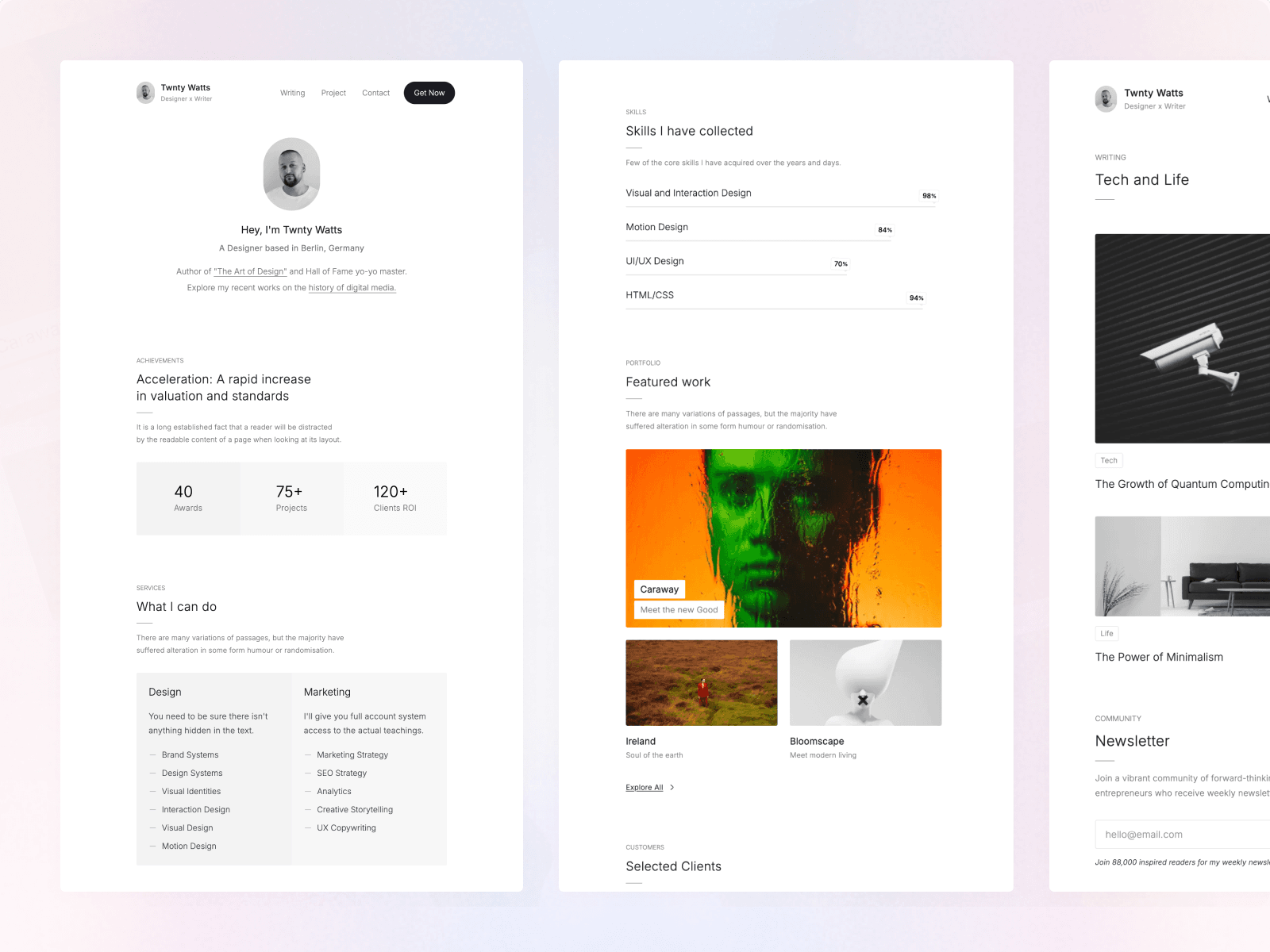
Twnty Astro is a sleek theme built for professionals who want a resume, CV, portfolio, and blog in one place. It is fully responsive, SEO-friendly, and easy to customize — built with Astro v6.1.8 and Tailwind v4.2.2. Price: $79.
Why it stands out:
- 13 ready-made sections: Intro, Achievements, Services, Experience, Skills, Testimonials, Projects, Blog, Clients, Pricing, FAQ, Contact, and 404
- Project lists with dedicated single pages and next/prev navigation
- Full MDX/Markdown blog system
- Sticky header and a clean, minimal aesthetic
- Google PageSpeed (desktop): 100 / 96 / 100 / 100
Best for: Freelancers, consultants, and professionals building a personal brand that doubles as a blog. If your portfolio needs to read like a structured CV — experience, skills, services, pricing — Twnty Astro is the most complete option.
2. Aver Astro — Best Portfolio & Blog Theme
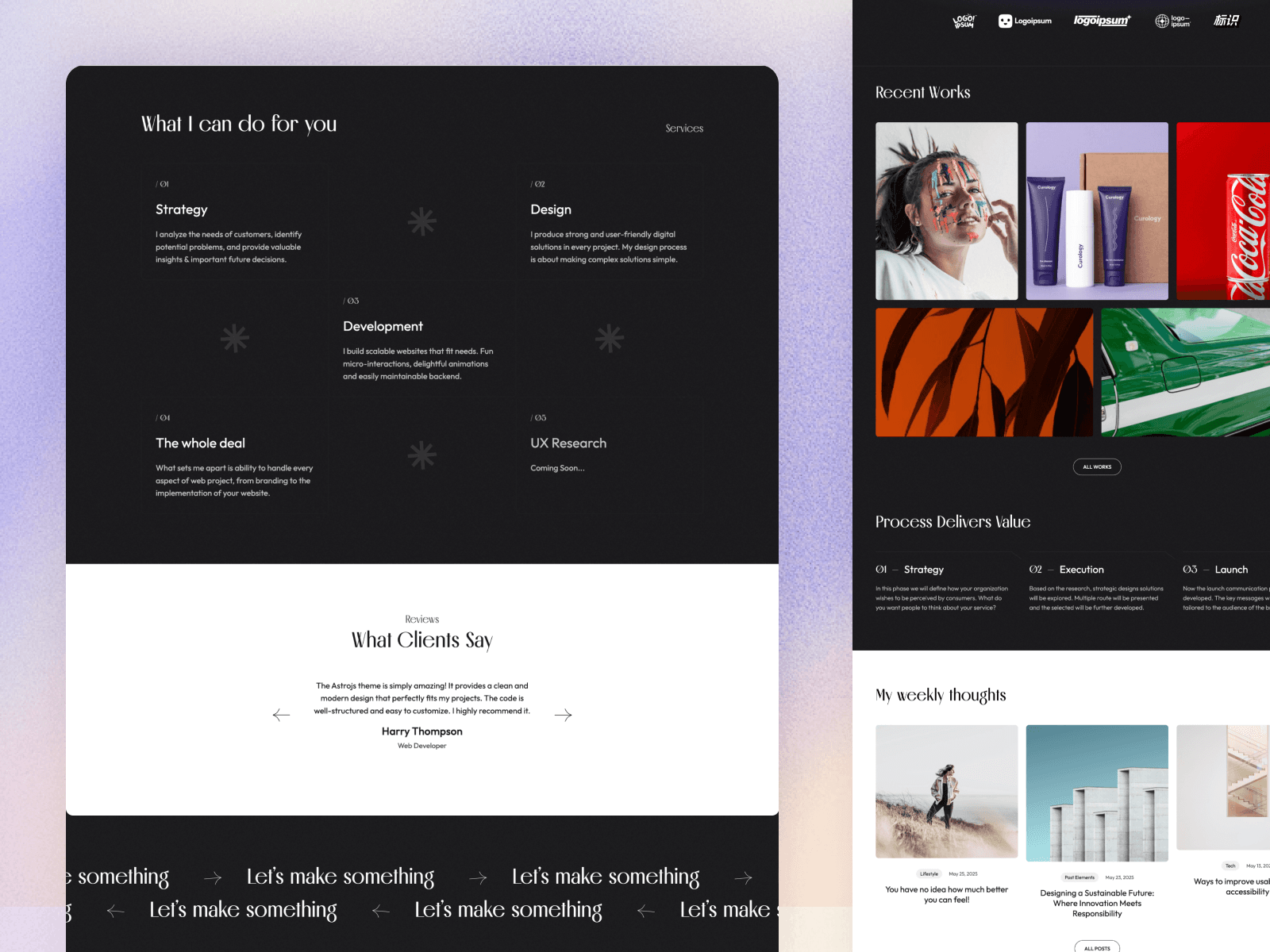
Aver Astro is a modern, performance-focused theme for portfolios and blogs. It pairs a beautiful dark-light mixed mode with smooth scroll animations, and it ships TinaCMS support for visual content editing. Built with Astro v6.1.8 and Tailwind v4.2.2. Price: $59.
Why creatives love it:
- Animated project previews with dedicated single pages
- Dark-light mixed mode (not a basic on/off toggle)
- Smooth scroll animations
- MDX/Markdown content with TinaCMS support
- Sticky header and a minimal, image-forward layout
- Google PageSpeed (desktop): 99 / 100 / 100 / 100
Best for: Designers, photographers, and creative developers who want a visual portfolio that pairs with a personal blog. At $59, Aver Astro is the most affordable premium pick in this list.
3. Astrofy — Best Free Astro Portfolio
If you want a free starting point, Astrofy remains the go-to open-source Astro personal portfolio template. It is MIT-licensed and built with Tailwind, with a CV section, blog, project gallery, and store page.
- Personal portfolio and CV layout
- Blog and RSS feed included
- Tailwind-based, easy to fork
- Active open-source community
Best for: Developers who want a portfolio without spending a dollar — but expect to do your own design polish and component wiring.
Which Astro Portfolio Theme Fits Your Role?
Different roles need different layouts. Here is how the picks map to common cases:
- Software developers — you want a clean projects grid, links to GitHub and live demos, and a blog to share write-ups. Aver Astro suits this best with its animated project previews and built-in blog.
- Designers and creatives — your work is visual, so an image-forward layout with smooth animations matters most. Aver Astro again leads here, with a dark-light mixed mode that makes screenshots pop.
- Freelancers and consultants — you are selling services, so you need pricing, testimonials, and a contact flow alongside your work. Twnty Astro ships all of these as dedicated sections.
- Job seekers — a structured, scannable CV beats a flashy gallery for recruiters. Twnty Astro reads like a resume while still supporting a blog.
- Students and hobbyists — if budget is the constraint, start with Astrofy and upgrade to a premium theme once your work warrants it.
If you are not sure, default to Twnty Astro for a services-and-CV focus or Aver Astro for a visual showcase.
Astro Portfolio Theme Comparison Table
| Theme | Best for | Price | Astro | Tailwind | CMS | PageSpeed (desktop) |
|---|---|---|---|---|---|---|
| Twnty Astro | Resume / CV / Portfolio + Blog | $79 | v6.1.8 | v4.2.2 | — | 100 / 96 / 100 / 100 |
| Aver Astro | Portfolio + Blog | $59 | v6.1.8 | v4.2.2 | TinaCMS | 99 / 100 / 100 / 100 |
| Astrofy | Personal portfolio | Free | latest | ✅ | — | varies |
Premium vs Free: Which Should You Pick?
The choice comes down to three questions:
- How much customization do you need? Free themes like Astrofy are excellent starting points, but you will spend hours rewiring components and tightening the design. Premium themes such as Twnty Astro and Aver Astro ship the design system already assembled.
- Do you need ongoing updates? Premium themes include version bumps for new Astro and Tailwind releases — check the Updated date on each theme page before you buy.
- What is your time worth? A $59 theme that saves a weekend of work pays for itself immediately.
For a personal brand or anything client-facing, a premium theme almost always wins on total cost of ownership. For a throwaway experiment, free is perfectly fine.
How to Customize Your Astro Portfolio Theme
Once you have picked a theme, getting it running is straightforward:
# Install dependencies
npm install

# Run the dev server
npm run dev
Open http://localhost:4321 and edit src/content/ to add your projects and posts. Most premium themes expose a single config file (often src/config/) where you set your name, navigation, social links, and theme colors without touching component code. Every Platoltheme theme also ships with documentation linked directly from its product page.
SEO Tips for Astro Portfolio Sites
A good theme handles most of your technical SEO, but the rest is on you:
- Set canonical URLs so duplicate pages do not compete.
- Add JSON-LD structured data for your articles and projects.
- Optimize images with
astro:assetsand serve AVIF/WebP. - Write meta descriptions manually for every key page.
- Build internal links between your projects, posts, and homepage.
New to the framework? Our beginner's guide to Astro walks through the fundamentals before you start customizing.
Frequently Asked Questions
What is the best Astro portfolio theme in 2026?
It depends on your use case. Twnty Astro is the best pick for a resume or CV-style portfolio with thirteen ready-made sections, while Aver Astro is the best choice for a visual portfolio paired with a personal blog and TinaCMS support.
Are there free Astro portfolio themes?
Yes. Astrofy is a popular open-source Astro portfolio template under an MIT license. Free themes are great for side projects, but you will spend more time wiring components and design together than with a premium theme that ships a complete design system.
Do Astro portfolio themes include a blog?
Most do. Both Twnty Astro and Aver Astro ship with a full MDX and Markdown blog system, including single post pages, so you can publish articles alongside your portfolio without adding a separate tool.
Can I use a CMS with an Astro portfolio theme?
Yes. Aver Astro ships with TinaCMS configuration ready to use, so you can edit content through a visual interface. Other Astro themes integrate with Contentful, Sanity, Storyblok, and Decap CMS via standard adapters.
Are Astro portfolio themes good for SEO?
Astro generates clean static HTML by default, which search engines crawl easily. Combined with built-in meta tags, sitemaps, and image optimization, Astro portfolio themes typically rank well and score near-perfect Lighthouse results out of the box.
Conclusion
A portfolio is where opportunities start, so the theme behind it matters. For a structured resume and CV site, Twnty Astro gives you the most sections out of the box. For a visual, image-forward portfolio with a built-in blog and CMS, Aver Astro is the best value at $59. And if you are on a zero budget, Astrofy is a solid free starting point.
Pick the one that matches your use case, prioritize active maintenance, and you will have a fast, SEO-friendly portfolio live in a weekend. Browse the full collection of Astro themes to compare live demos and pricing.